
Congratulations! You are now just a step away from effectively monitoring your Google ads performance, and our free Looker Studio dashboards will help you make data-driven decisions.
We are excited to be part of your journey toward business growth by providing easy-to-use and insightful dashboards to track your ads performance.
In addition to the google ads dashboards, we’ve also created free dashboards for GA4, Google Search Console, Google Business Profile, and YouTube.
These dashboards are free to use and provide a comprehensive view of your digital marketing performance across multiple platforms.
Select a Google Ads Account
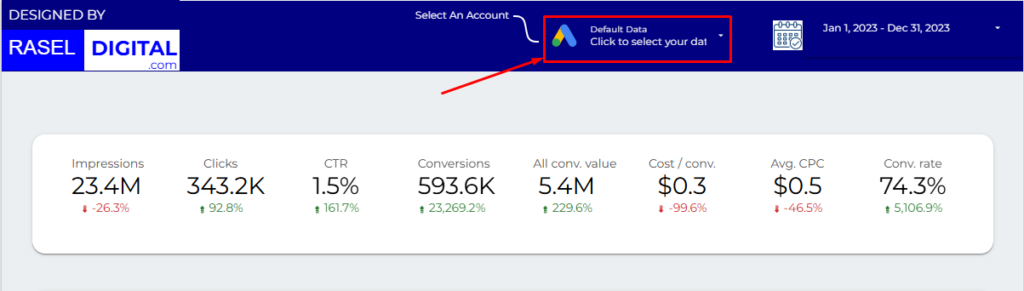
At first you have to select a Google ads account whose data you wish to view. You must have access to the ads account to your Gmail.
Filters to Enhance Your Dashboard Experience
Our dashboards have powerful filters designed to help you customize and refine the data you see. These filters allow you to drill down into specific metrics and better understand your marketing performance.
Here’s a breakdown of the filters available in the GA4 Looker Studio templates:
1. Date Range Filter
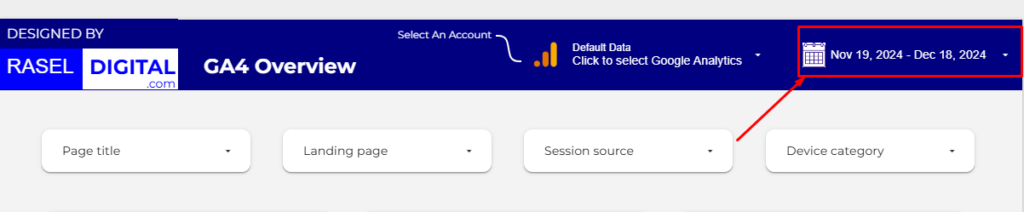
With this filter, you can select a specific date range to analyze your ads performance. You can choose from predefined options like yesterday, last 7 days, last month, or last year, or customize the range based on your needs.
Benefit: This allows you to track and compare your ads performance over different time periods, helping you identify trends and seasonal fluctuations.
2. Campaign Filter
This filter allows you to focus on specific campaigns within your Google Ads account.
- Why it’s useful:
It helps you compare the performance of different campaigns, such as branding vs. conversion-focused campaigns. You can quickly identify which campaigns are driving the most clicks, conversions, or impressions. - How to use it:
Simply select a campaign from the dropdown menu to view metrics like cost-per-click (CPC), click-through rate (CTR), and conversion rate for that campaign alone.
3. Ad Group Filter
Drill down further into your campaigns by analyzing individual ad groups.
- Why it’s useful:
This filter helps you evaluate the performance of ad groups, making it easier to spot underperforming groups or high-performing ones that may deserve more budget. - How to use it:
Select an ad group from the filter to analyze metrics like keyword performance, ad relevance, and audience engagement.
4. Keyword Match Type Filter
Understand how different keyword match types (Broad, Phrase, Exact) are performing.
- Why it’s useful:
It provides insight into which match types are driving the best results. For example, Exact Match keywords may bring highly targeted traffic, while Broad Match may increase reach. - How to use it:
Apply the filter to segment performance data by match type, helping you optimize your keyword strategy for better ROI.
5. Device Filter
Analyze how your ads perform across different devices, such as desktops, mobile phones, and tablets.
- Why it’s useful:
Knowing which devices drive the most conversions or clicks helps you tailor your campaigns. For instance, mobile-focused campaigns might need different bid strategies compared to desktop campaigns. - How to use it:
Use the device filter to view performance metrics by device type and optimize your ad creatives and landing pages accordingly.
How These Filters Help You
These filters not only simplify your analysis but also empower you to:
- Identify Trends: Spot patterns in performance at a granular level.
- Optimize Campaigns: Focus on what’s working and reallocate budgets for maximum impact.
- Save Time: Quickly access the data you need without navigating through cluttered Google Ads reports.
- Drive Results: Use actionable insights to refine your campaigns and achieve your marketing goals.
By effectively leveraging these filters, you can gain deeper insights into your Google Ads campaigns and easily make smarter, data-driven decisions. Whether you’re a beginner or an experienced marketer, these tools are here to help you maximize your ad performance.
Need assistance? Our team at Rasel Digital is here to help! Contact us anytime for support and guidance.